

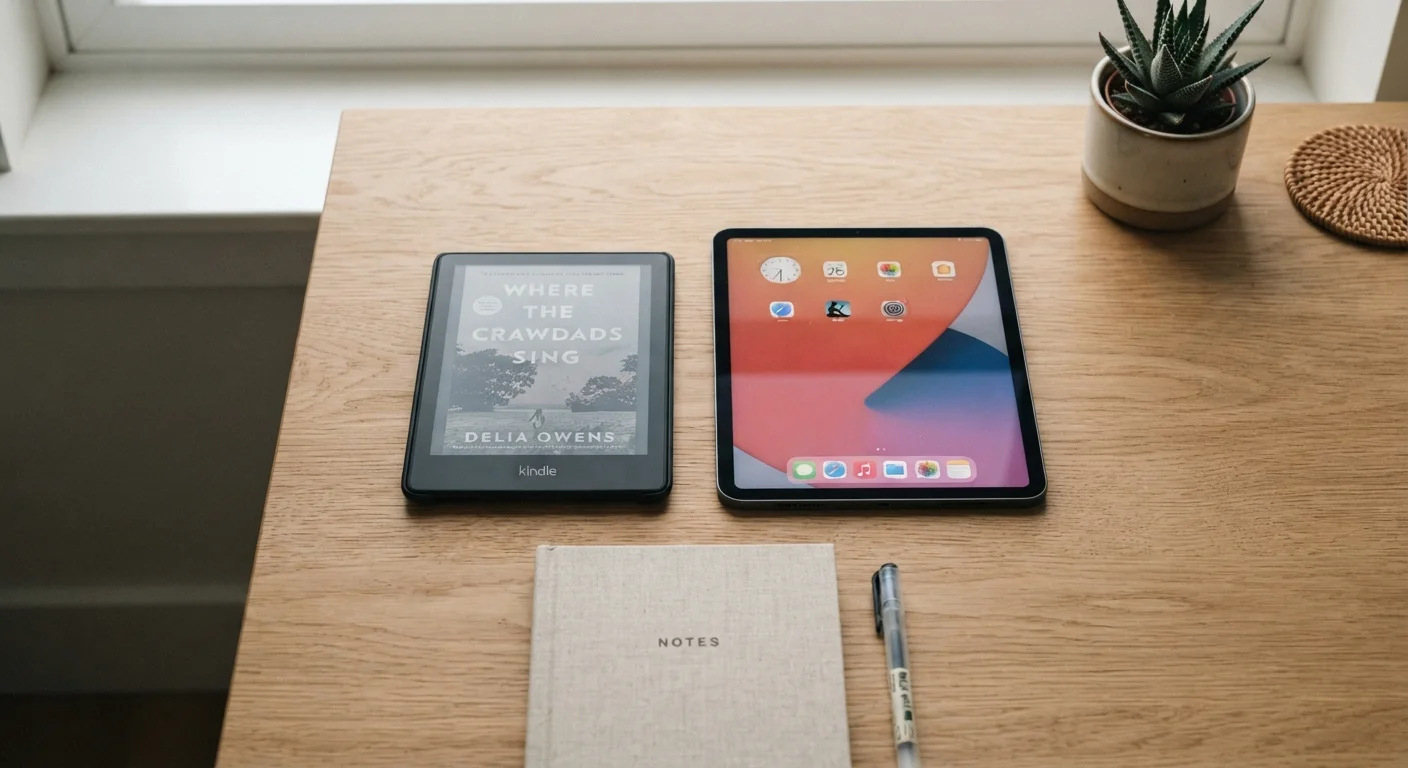
Our Verdict
For readers who regularly sit down with a book for an hour or more, an e-reader's paper-like display, featherweight design, and multi-week battery life make it the purpose-built tool for the job. Tablets make more sense for casual readers who also want video, apps, and web browsing from a single device - but that versatility comes with real trade-offs in eye comfort and distraction.
| Best for | Recommended |
|---|---|
| Daily or dedicated readers logging long sessions | E-reader |
| Casual readers who also stream, browse, and use apps | Tablet |
| Travelers prioritizing lightweight gear and long battery life | E-reader |
| Readers of magazines, comics, or heavily illustrated content | Tablet |
The Screen Technology Gap That Changes Everything
The most fundamental difference between e-readers and tablets isn't price or portability - it's how each screen produces an image.
E Ink displays (used in virtually all dedicated e-readers) work by electronically shifting tiny pigment particles to form text and images. Because those particles stay in position without continuous power, the screen only draws energy when the page changes. More importantly, E Ink is a reflective technology - it bounces ambient light back to your eyes, the same way a printed page does. There is no backlight shining directly at you.
Tablet displays - whether LCD or OLED - are emissive: they generate their own light and project it toward the viewer. That's what makes tablets vivid for video and color-rich apps. But during extended reading, the direct light emission is what many people find tiring, particularly in dim environments.
Most modern e-readers do include a front light (not a backlight) - a subtle glow that illuminates the E Ink surface from the side rather than shining through it. The effect is closer to a reading lamp than a screen. For a broader look at how display specs translate to real-world experience, see our guide to what smartphone specs actually mean.
| E-Reader | Tablet | |
|---|---|---|
| Display type | E Ink (reflective) | LCD or OLED (emissive) |
| Eye comfort for long sessions | High - paper-like surface | Moderate - direct light emission |
| Battery life | 2-8 weeks typical | 6-12 hours typical |
| Color & image quality | Limited (most are grayscale) | Excellent full color |
| Distraction potential | Low - single-purpose design | High - full app ecosystem |
| Weight (typical) | 140-210 g | 400-700 g with case |
| Best content formats | Novels, articles, text books | Magazines, comics, illustrated books |
| Versatility | Reading-focused only | Reading, video, productivity, apps |
Battery Life: Weeks vs. Hours
Battery endurance is where e-readers hold their most lopsided advantage. Because E Ink consumes power only when refreshing the screen, a fully charged e-reader can typically last anywhere from two to eight weeks under normal reading use. A tablet, regardless of screen technology, runs an active processor, maintains wireless radios, and powers a continuous display - resulting in battery life measured in hours, usually six to twelve for moderate use.
For most people at home, plugging in a tablet overnight is no hardship. But for travelers, commuters, or anyone who resents charging anxiety, the e-reader's endurance is a meaningful practical advantage. See our article on extending the life of your everyday gadgets for charging habits that keep both device types healthier longer.
Reduce Eye Fatigue on Either Device
If you read on a tablet, enable a night or warm-light mode that shifts the display toward amber tones in the evening - this reduces blue-light exposure before sleep. On an e-reader, set the front light to the lowest comfortable level; your eyes adapt quickly, and lower brightness reduces cumulative fatigue over long sessions.
Distraction and Focus: The Hidden Difference
A tablet is a general-purpose computer. That means every notification, app icon, and browser tab is one tap away while you're mid-chapter. Research into attention and digital media consistently finds that the presence of notifications - even when ignored - increases cognitive load and reduces comprehension during reading tasks.
An e-reader, by design, does very little outside of reading. It can browse a built-in bookstore and often supports a basic web browser, but slow E Ink refresh rates make those secondary functions genuinely inconvenient. That friction is, for many readers, a feature rather than a flaw.
If you're evaluating the role of notifications and feature bloat more broadly across devices, our overview of smartwatch features that get used daily vs. ones that rarely do applies the same thinking to wearables.
Where Tablets Win: Color, Format, and Versatility
E-readers earn high marks for novels, long-form journalism, and text-heavy nonfiction. They are demonstrably weaker for content that depends on color and layout fidelity - illustrated children's books, graphic novels, magazines, cookbooks with full-bleed photography, and technical documents with complex diagrams all render far better on a tablet's high-resolution color display.
Tablets also run reading apps (the same ones available on e-readers' app ecosystems) alongside streaming, note-taking, and productivity tools. For a reader who only finishes two or three books a year, owning a separate e-reader may feel redundant when a tablet already serves their casual reading needs.
65%
Adults reporting digital eye strain
According to the American Optometric Association, roughly 65% of Americans report symptoms of digital eye strain from extended screen use.
2-8 weeks
Typical e-reader battery life
Most current e-readers are rated for several weeks of reading use on a single charge, compared to hours for tablets.
The trade-off is real, though: a device that does everything is rarely the best tool for any one thing. If reading is genuinely central to your daily routine, the purpose-built design of an e-reader reflects that priority in ways a tablet can't fully replicate.
Weight, Form Factor, and the Physical Experience
Most e-readers weigh between 140 and 210 grams - roughly the feel of a slim paperback. Many tablets, particularly larger models with protective cases, weigh 500 grams or more. Over a two-hour reading session held in one hand, that difference in wrist and arm fatigue is noticeable. E-readers are also generally narrower, easier to hold one-handed in portrait orientation, and designed specifically to mimic the ergonomics of a book.
Screen size is worth considering too. A 6- to 7-inch e-reader suits most fiction and standard text formats well. Readers who prefer larger type or work with PDFs and technical documents may find a larger e-reader (some models reach 10-13 inches) or a tablet-sized screen more practical.
Neither device is inherently fragile, but both benefit from protective cases. For a framework on choosing and maintaining personal devices, the same planning principles that apply to building a whole-home smart device ecosystem - matching devices to actual use cases before you commit - apply here just as well.
The content on this site is for informational purposes only and is not a substitute for professional advice. Always consult a qualified professional for guidance specific to your situation.